Tuesday, December 20, 2011

Social Media & Mobile Devices

As some of you may already know, I`m as bad as anyone when it comes to social media. Twitter, Facebook and Google+ as well now being my main outlet. Twitter is where I have mainly been in the last 2 year but increasingly more I like Google+. 


With so many things changing and social media being no exception, it has evolved in to something completely different to what we knew 2 years ago. Facebook seem to take on the role of dumping ground. Everything is on there and with some of the vile comments made it is not always a nice place to be. Twitter has become a voicing platform for everyone. The good thing is you know most of the time you tweet to a public audience so the comments are never as bad as Facebook. Google+ the new kid on the block at the moment is just great. The teenage generation don`t seem to like it and us slightly older teenagers can post away to our hearts are content. Plus I find the subject matter on G+ a lot more entertaining.


This brings me on to the second part of this post, Mobile Devices.
With my love of all things computer related I still struggle with the mobile devices or more to the point how there used. From the humble mobile with Wi-Fi connection, right through the android phone, iPhones and all the tablets that are out there. I have no problem with these devices but how they are used. Constant bleeping, piping, ringing sometimes drives me a little mad. Even the email notification drives me insane. I have no problem with this during the day, but when it starts to interact with your life to the degree that you have to have your device beside you even overnight well that starts to break down relationships etc. To be laid in bed in the early hours and hear a noise that wakes you, then watch while someone looks for a few minutes, reads an email or comments on a post, smiles and when you ask they say it was nothing, I don`t know why it did that. Well I`m sorry but even for me it is too much. My Laptop goes off over night or while I am sleeping.
These are only my thoughts on this matter and are aimed at no one in particular but I had to share them with you.


Colin h

Saturday, April 30, 2011

1st Social Network Royal Wedding

After finally getting the day off from my reluctant boss, I said I was not going to watch the Royal Wedding. But as time was drawing on and my time line on Twitter had gone in to melt down. With tweets commenting and criticising, I could not stop myself switching on the TV. Yes I was away, watching and tweeting. This is what social network is made for, the whole of society getting involve in a way we have never seen before and wasn't it great.


It all started with the comments about Tara P T hat and I couldn't resist saying she looked like a rhino. From then on I didn't really need the sound on the TV, Twitter was all I needed.
I was watching all the small things that you think that no one else will spot, like Charlie walking into the Abbey, removing his gloves, wiping his nose and then shaking the first persons hand he meets. Within seconds there were tweets saying the same and how rude. This just goes to show that we are all looking for the perfect people not to be so perfect.


I have learnt one thing about this, don't tell anyone your getting married and if you do tell anyone don't invite the worlds press.
Bring on the next one. Haha

Colinh

Tuesday, April 5, 2011

KDE 4.6.1 & Windows 7 Desktops

It is not really fair to compare the two desktops in the same way as the MS desktop is embedded into the OS, where as KDE runs as a program on top of the OS. But then saying that the end user only can see a functional desktop whichever they use. For years the basic desktop has run the same, a background with icons and a task bar. This has not really changed. KDE did start the KDE 4 project without a task bar, which could be broken down into many parts and placed on the screen anywhere. I don't believe this was to successful as the default desktop starts with a task bar again. Here is a quick run through the desktop and how similar they are becoming.


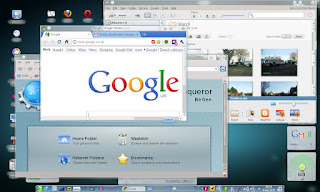
I have used the same wallpaper on these shots just so it makes it easier to see the differences. Both desktops have Gadgets/Plasmoids, both have similar icons and both have a task bar with the new look white icons in the system tray (see below).


One small difference I can tell you about is that MS defaults with a single desktop in which you can run multiple programs. On a KDE desktop it will run multiple desktops in which multiple programs can be run in each. Then it also has the ability to run multiple environments in the same login at the same time, which will also run multiple desktops etc.


Here are a few screen shots of both Windows 7 and KDE 4.6 running with the same programs on the screen.

Both desktops support all the fancy effects you come to expect from a modern system and at the end of the day it is down to the user which they prefer. This is slightly biased by larger companies only writing software for Windows and not always supporting other OS's such as Linux.

Colin H


Wednesday, March 9, 2011

Physical Pain vs Mental Pain

As someone who has suffered with a bad back for more years than I want to remember, pain is something you would think I am use to by now. The problem with any pain is it hurts. One look at someone`s face and you ask “are you in pain?” But the face hides so much pain in one expression, how do you know that person is in physical pain?  I have now been married for 27 years and even the people that are around me still will say “is you`re back playing up again today?” All I can say is yep and turn away. That in turn has answered the question and nothing more is said. Now although from an outside view the pain is caused by my back, 50% of the time the pain is mental. I have been worn down by weeks of physical pain and a complete lack of sleep. This in turn brings on stress, frustration and then mental pain. In some ways it hurts just as much as physical pain, but you can`t show anyone it or really take anything for it without looking as if you`re having a breakdown.

2010 was a very strange year for me as I lost a very good friend who would help me out whenever I was really suffering with my back, even though she was suffering from spinal cancer. I then gained a friend I had never met before 2010 but we just got on like a house on fire. This caused a bit of a stir at the time in the work place as some people in the office could not see how a man and woman could have such a great friendship without having a relationship. The other thing is that my wife works in the same office and she was fine with it. Some people are just so old fashion. J

Early in 2011 my now best mate had to move on due to finding a new job and could not miss out on the opportunity of increased her pay and working a lot nearer to home. When you have such a close friendship as that it does knock you back when they say they have now got to move on. Again this causes pain, maybe not a physical pain or not really a mental pain but a pain that can hurt. Before you all say, “well we have phones, skype and emails” it is not the same as sitting down and having a good chat over a cup of tea. Call me old fashion in that way. J

So to sum up, when you see someone in pain don`t just jump in and say “what have you hurt” and “give it a week or so and you won`t know you`ve done it” as sometime that not going to help in the slightest and on occasions make it worse.  Pain is such a strange emotion and can be caused through so many things, injury, stress, frustration and many other things. Oh and don`t forget love and relationships.
I have had my fair share of pain in so many ways, as I`m sure most of you have.
I am in pain at present but you can`t tell what is causing it! The only person who may be able to tell you what was causing it is/was the closest to you (partner or friend).

ColinH

Monday, December 27, 2010

The Evolution of KDE Desktop


 From its humble beginnings as a Unix type OS desktop package, KDE (K Desktop Environment) is now a cross platform application which will run on Linux, Unix, FreeBSD, Solaris, Mac OS and even MS Windows.
Mainly used as the main desktop on Linux systems such as OpenSUSE, Mandriva and Kubuntu.
This is just a light look at the evolution of KDE, mainly pictorial and a few comments thrown in.

KDE 1
July 1998
With the release of KDE1, Linux now had a functional desktop to complete with MS. By today's standards you would sat it is very basic, but it did the job well.

KDE 2
October 2000
KDE2 saw improvements, but it was not until we saw KDE3 that the layout became a lot slicker.

KDE 3
KDE 3.2
KDE 3.4
KDE 3.5
April 2002

From the first release of KDE3 to the final version in 2008 KDE3.5.10 saw the greatest changes. KDE3 was still being developed when the first release of KDE4 came along.

KDE 4.1
January 2008
This was a very different environment to anything else the KDE team had release before.
The first KDE4 saw a new look and feel with no task bar and the option to position any of the normal desktop functions anywhere on the desktop. I must admit that the early versions of KDE4 were very unstable.

KDE 4.5 Plasma Desktop
KDE 4.5 Netbook Desktop

The KDE team have now had 2 years get it right. Now with KDE4.5 being the stable version and KDE4.6 beta also being developed. It now has a slick desktop to match anything MS Windows7 can do. With its plasma desktop or netbook desktop, widgets, glass like window frames and unlimited amounts of desktop features, KDE has come a long way.

My desktop KDE 4.5
My desktop  KDE 4.6 beta Glass frames.
I still do to this day get very frustrated with KDE, but this is due to the fact that I run the development version all the time, which can be rather unstable.
Why not give it a try and you will be surprised.
ColinH

Sunday, December 26, 2010

Who would put themselves out for you ?


 Now I sure if some people I know will take this the wrong way, but it is not a dig at anyone. Just my thoughts on what is happening in this modern world we live in.

There was a time when you would not think twice about helping your neighbours and living on a road which is ¼ of a mile long and only has 6 houses, I always try to help them. All be it that sometimes it is not the help but the time of day they ask for help which may get to me from time to time. Saying that, both of the 2 nearest neighbours to me always thank me to the stage I get very embarrassed.

Back to my point. If someone is talking about something and I think I can help, I will jump in and offer. I know that is my fault and I am learning not always to do that now. But if I think I can help then I will say.
I have done such a wide variety of jobs helping people from repairing computers, rewiring a friend kitchen, completely fitting a kitchen, repairing unlimited amounts of electrical good, helped a friend with a little bit of tractor driving and even went to catch a hamster under a friends floorboards. The list goes on and on, which I must add I did not charge a penny for.

Now this is where it gets my back up. Most of the time I will offer to help. It is only rarely that someone asks me for help. This is my choice and I am not bothered. But how many times does someone offer to help you? Very few. Now when I have ask for help. Sometimes I will get a little, but most of the time I get “ Sorry I am a bit busy at the moment”. In other words, I don't really want to help you. Even my best friend was going to help me with these blog postings, typing and grammar, but I have ended up doing them myself. And that is not another dig either.

I will throw a question in at this point. Is it just built in to some of us to help others or is it something we learn? If we learn it I do not know where I learned from as I can not remember my Dad helping many people.

I have really shortened this posting because no one want to be reading about these sort of things at time of year.
So to sum up. Who would put themselves out for you? And the answer is a lot different and not as many as you think. To start with I thought loads, but after careful thinking I got down to a few you could count on 1 hand. After that I also started thinking how many of these few would offer help and the answer you would probably find is none.

Just remember, this is not a dig at anyone I know but an observation by me. Also things can change in your life which can also change other people thinking.
ColinH

Sunday, December 12, 2010

Dual boot laptop

Dual boot laptop.
When I went out and bought myself a laptop with no O/S installed, I got some strange look and people asking me why I wanted to spend £320 on a laptop that has nothing on it. My reply is “I want a laptop to do what I want to do and not what everyone else wants to see or work”.

Special delivery arrives and there is my brand new laptop. I unpack it and all I have is the machine, PSU, handbook and a disc. I then went through the normal things, charging and preparing for installing the O/S`s.

First I installed a copy of XP that I had but never used. No problems there, all the updates and motherboard drivers installed and I was away. One laptop with XP installed.

Now I am not very happy at this point as I would rather use Linux. So now it is time to install my Linux O/S. My choice is openSUSE and at the time it was version 11.2. Now before you ask why I installed XP first, this is because with a dual boot machine it is better to install the FAT32/NTFS first. This also helps set up the grub boot loader in Linux.


So armed with my openSUSE DVD I rebooted the laptop and let it boot from the disc. OpenSUSE boot options appear and I select the installation option. This in turn loads a Linux kernel and proceeds to the install section. This can be quite daunting if you have never installed Linux before or you start to worry whether it is going to overwrite your windows that you have already installed. You are now presented with a graphical install screen, select your country, e.g. UK and then continue.


 It will then check your machine and ask you what graphical desktop you want to use, e.g. KDE, Gnome. Linux is different to windows in that respect as the desktop is only another program running on top of the kernel, hence different desktops. I selected KDE and continued. This then checks again and comes up with a standard program list for a running O/S.


 The partitioner gives you a default option, at this time it wanted to shrink the 240Gb HDD down to 30Gb for the NTFS and the rest for Linux. I manually alter this to 80Gb for the NTFS and the rest for Linux. There are a lot of other manual configuration options if you require, but I will not go into that to deep for now.


The complete install options are now shown again with the changes I have made. I agree and push the install button.


This take about 30 – 40 minutes, which is a similar wait and things to installing windows.


When complete the machine will reboot and on reboot I have a grub loader screen asking me which system I would like to use. I have openSUSE set as the default option.


I have kept it very simple as it is one of my first blogs, but there are plenty more options with multiple desktop options in Linux. But that is for another day.

ColinH